 PitchShed
Pro
Change the key
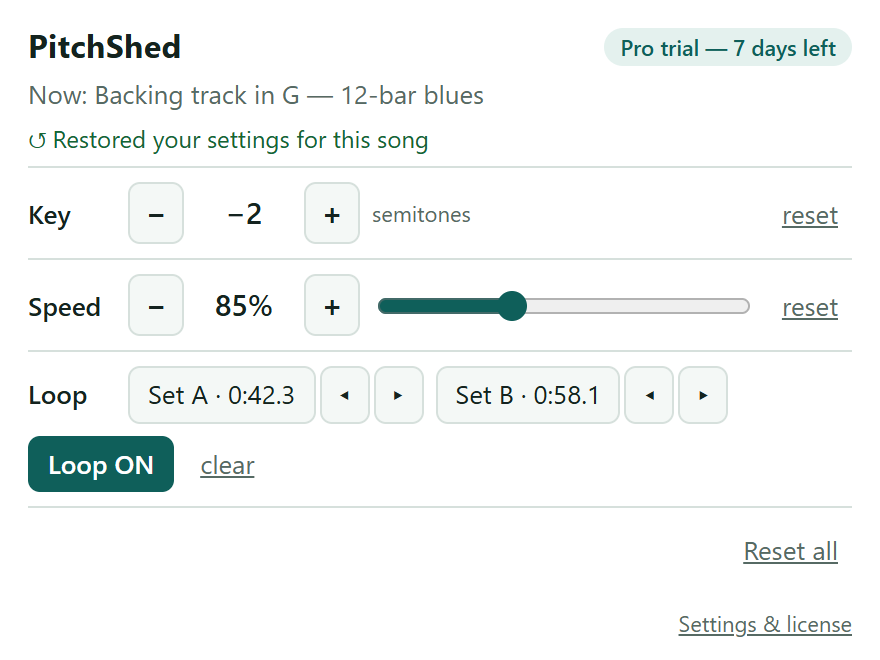
Move a song up or down by as many as 12 semitones — a full octave either way. Fit the song to your voice, or to the guitar in your hands. It plays live in the tab; nothing is downloaded or recorded.
A practice tool for your browser
PitchShed lowers or raises the song you are practicing in semitones, slows it down without changing the pitch, and loops one section — right in the tab where it plays. It remembers your settings for every song, so tomorrow's practice starts where today's ended.
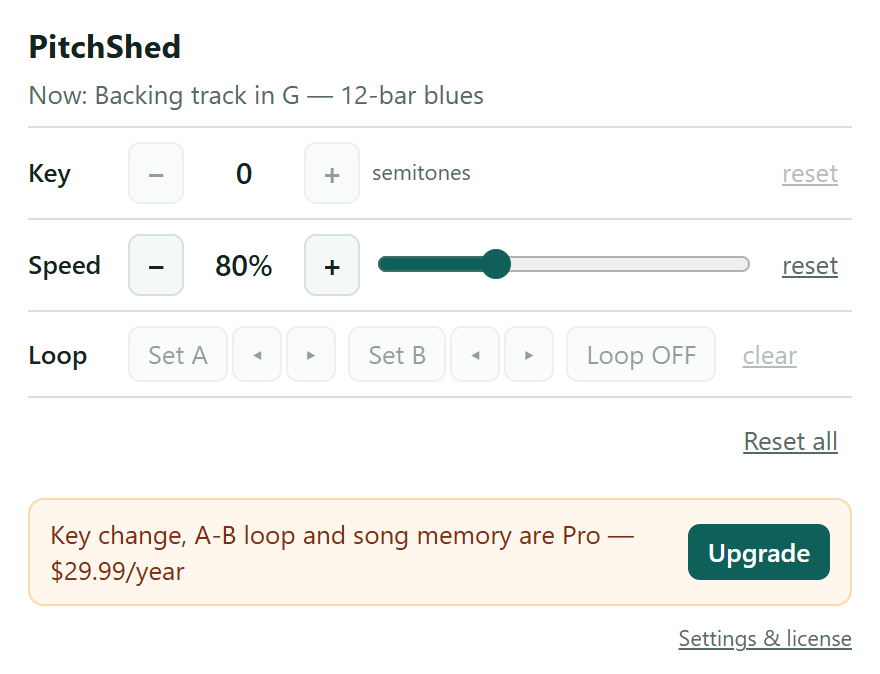
Speed is free for good. Everything else is free for 7 days — no card, no sign-up. See the pricing.
The store listings open soon. These buttons switch on the moment they are live.
Install PitchShed from your browser's store. It asks for no access to the sites you visit — it can only touch a tab after you click its icon.
Start any video or audio on a page — a YouTube video, a backing track, a lesson — and click the PitchShed icon in that tab.
Move the key in semitones, set the speed, mark A and B to loop a section. PitchShed saves it for that song, ready for next time.
Pro
Move a song up or down by as many as 12 semitones — a full octave either way. Fit the song to your voice, or to the guitar in your hands. It plays live in the tab; nothing is downloaded or recorded.
Free
Slow a passage to 50 % or speed it up to 150 %, in 5 % steps. The pitch does not move, so it still sounds like the song. Free, with no time limit.
Pro
Press Set A where the hard part starts and Set B where it ends. PitchShed repeats the section until you stop it, and you can nudge either point by a tenth of a second.
Pro
Key, speed and loop points are saved for each song on your device — up to 500 songs. Open the song next week, click the icon, and it is all back.
Speed control is free for good. Every installation also gets all of Pro free for 7 days — no card, no sign-up.
Forever
$4.99 / month
or $29.99 / year — about half the cost of paying monthly
Cancel any time. 30-day refund, no questions asked. Payments are handled by Paddle.
Not tried it yet? Start with the free 7 days. Add to Chrome
Speed control (50–150 %, pitch kept) is free with no time limit. Key change, A–B loop and song memory are free for 7 days after you install, and after that they need Pro: $4.99 / month or $29.99 / year. The trial needs no card.
No. There is no sign-up and no login. Pro is unlocked with a license key that you paste into the extension, or that the page you buy on hands to it for you. One key works on up to three browsers or machines.
No. Those services protect their audio with DRM, and PitchShed cannot process it. It works with ordinary web video and audio, for example on YouTube.
No. The sound is changed live inside your browser tab and goes straight to your speakers. Nothing is saved, uploaded or shared, and there is no download button.
Once per tab. PitchShed only ever touches a tab you click it in, which is why it needs no access to the sites you visit. After the click it stays on in that tab, also when you move on to the next video on the same page. A new tab needs a new click, and the settings you saved for the song come back with it.
Changing the key adds a small delay of about a tenth of a second (0.12 s) to the sound, so the sound trails the picture slightly. With the key at 0 nothing is added, and a plain audio track has no picture to be out of step with.
Desktop Google Chrome 116 or newer, and Microsoft Edge. Both stores have the same extension.
Your audio never leaves the browser, and there is no analytics. The only traffic is a license check with our own license server: when you activate a key, and after that at most once every 7 days. The privacy page has the details.
Use the link in your Paddle receipt email. Canceling stops future payments, and a refund within 30 days is yours for the asking — see refunds. If you would rather not deal with it yourself, email support from the address you paid with.
Tell us which one: email support with the page address. Some players can be supported; others, such as DRM-protected services and audio served from another domain without permission, cannot.
Short, practical answers. Each one ends with the quickest way to do it in PitchShed.
Free to start, and the first 7 days include everything.